
Inside Carbon: The Engineering Behind a Searchable Clipboard
The full technical story: SQLite FTS5, prefix indexes, keyset pagination, covering indexes, EXPLAIN QUERY PLAN, virtualized rendering, and why benchmarking with synthetic data caught bugs that "it works on my machine" never would have.
This is the technical companion to I Built a Clipboard Manager After Windows Forgot What I Copied. The first post explains why I built Carbon and what changed as its history grew. This one goes deeper into the decisions behind the rebuild: how Electron talks to SQLite, how indexes help Carbon find clips, why prefix search became slow, and how I kept a long timeline responsive.
I’ve tried to explain each term before leaning on it. If you’re a developer, the examples show the shape of the implementation. If you’re not, the explanations should still make clear what problem each part solves.
The stack
| Part of the app | Technology |
|---|---|
| Desktop shell | Electron 31 |
| UI | React, TypeScript, Tailwind CSS, Framer Motion |
| Database | SQLite through better-sqlite3 |
| Full-text search | SQLite FTS5 |
| Long-list rendering | react-window |
| Windows installer | electron-builder |
How the app talks to the database
Electron apps have a main process and one or more renderer processes. The main process manages application-level work. A renderer displays the web-based interface. Thinking of them as separate parts of the app helps explain an important Carbon design choice: the renderer does not talk directly to SQLite.
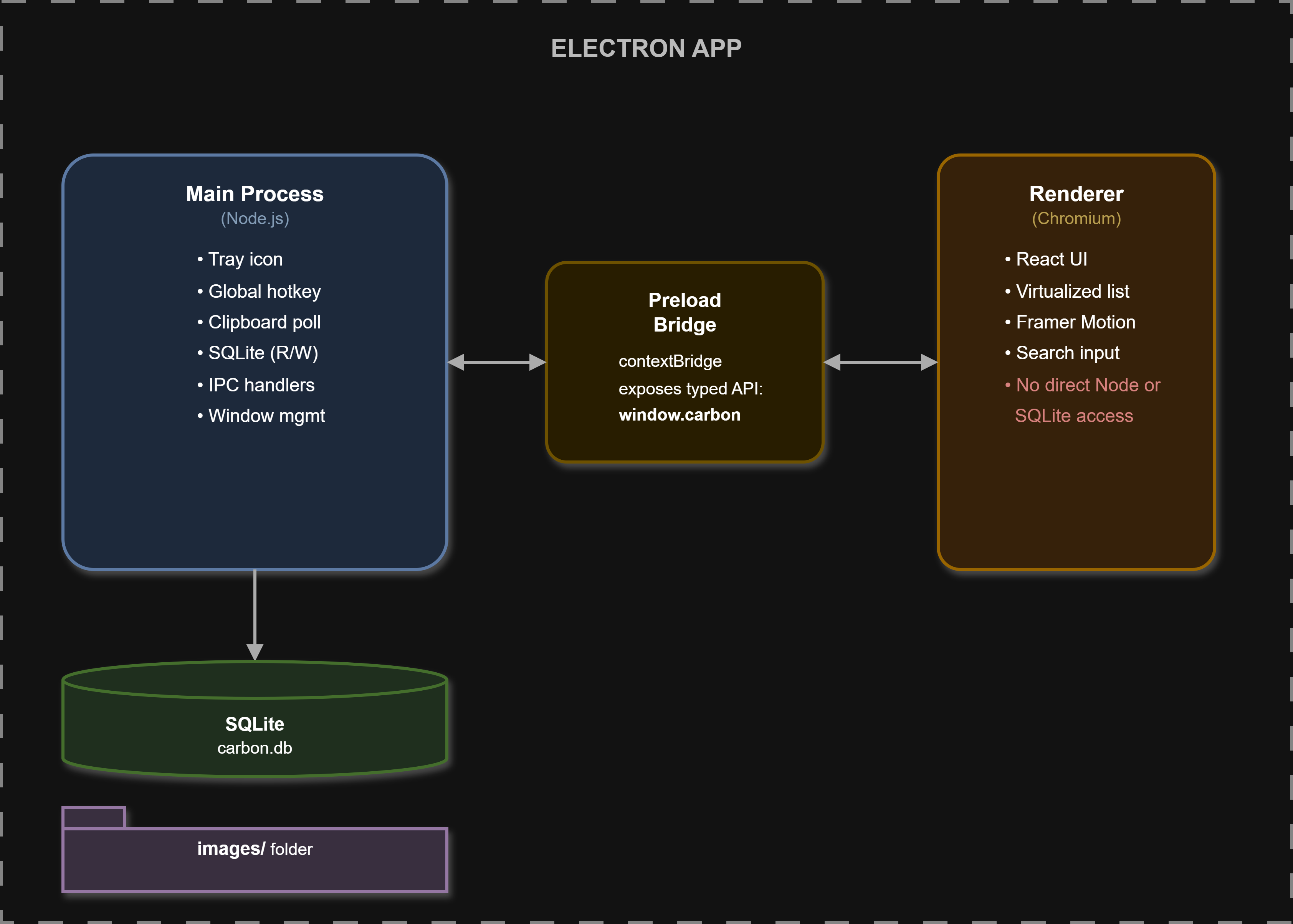
Instead, the UI asks for data through Electron’s inter-process communication system, usually shortened to IPC. The main process receives the request, runs the database query, and sends back the result. The preload script exposes only the app functions the UI needs.
The example below is shortened to show the boundary:
// Main process
ipcMain.handle('clips:getPage', (_event, query: ClipQuery) => getPage(query))
ipcMain.handle('clips:search', (_event, query: SearchQuery) => searchPage(query))

// Preload process
contextBridge.exposeInMainWorld('carbon', {
  getPage: (query: ClipQuery) => ipcRenderer.invoke('clips:getPage', query),
  searchClips: (query: SearchQuery) => ipcRenderer.invoke('clips:search', query),
})
This keeps the database connection in the main process and gives the renderer serializable clip data, not a raw database handle. New clips can also be pushed to the interface as events instead of having the UI repeatedly ask whether anything changed.
Version 1: a file was enough, until it wasn’t
The first version stored one JSON object per line in clips.jsonl:
{"id":1,"type":"text","text":"hello world","createdAt":1688000000000,"hash":"abc123"}
{"id":2,"type":"image","imageFile":"screenshot-1.png","createdAt":1688000100000,"hash":"def456"}
On launch, Carbon loaded the whole file into memory. Search checked every item. Adding, pinning, or deleting a clip rewrote the file.
That design was easy to understand and perfectly usable with a small history. Its weakness was that the amount of work grew with the number of clips. Loading and searching required looking at the collection as a whole, and even a small edit involved rewriting the whole file.
The SQLite schema
Moving to SQLite was not simply putting the old JSON objects somewhere else. The schema determines what data can be queried efficiently and what constraints the database can enforce.
CREATE TABLE clips (
  id         INTEGER PRIMARY KEY,
  type       TEXT NOT NULL,
  text       TEXT,
  image_file TEXT,
  width      INTEGER,
  height     INTEGER,
  created_at INTEGER NOT NULL,
  day        TEXT NOT NULL,
  hash       TEXT NOT NULL UNIQUE,
  pinned     INTEGER NOT NULL DEFAULT 0,
  copy_count INTEGER NOT NULL DEFAULT 1
);
A few choices are worth explaining:
created_atis an integer timestamp. Carbon stores epoch milliseconds and uses the value for ordering. The database can compare numbers directly.dayis stored even though it can be derived. It supports grouping clips by day and calculating daily activity without repeating date conversion in every query.hashis unique. When Carbon sees the same content again, it can recognize it instead of creating another row. It updates the timestamp and incrementscopy_countso the clip resurfaces in the timeline.Text and images have different fields. Text clips use
text; image clips refer to a stored image file and can include dimensions.
Indexes: a way to find the right rows
A database index is a separate structure that helps the database find or order rows without examining the entire table. A familiar analogy is the index at the back of a textbook. To find pages about a topic, you use the alphabetical index instead of reading every page.
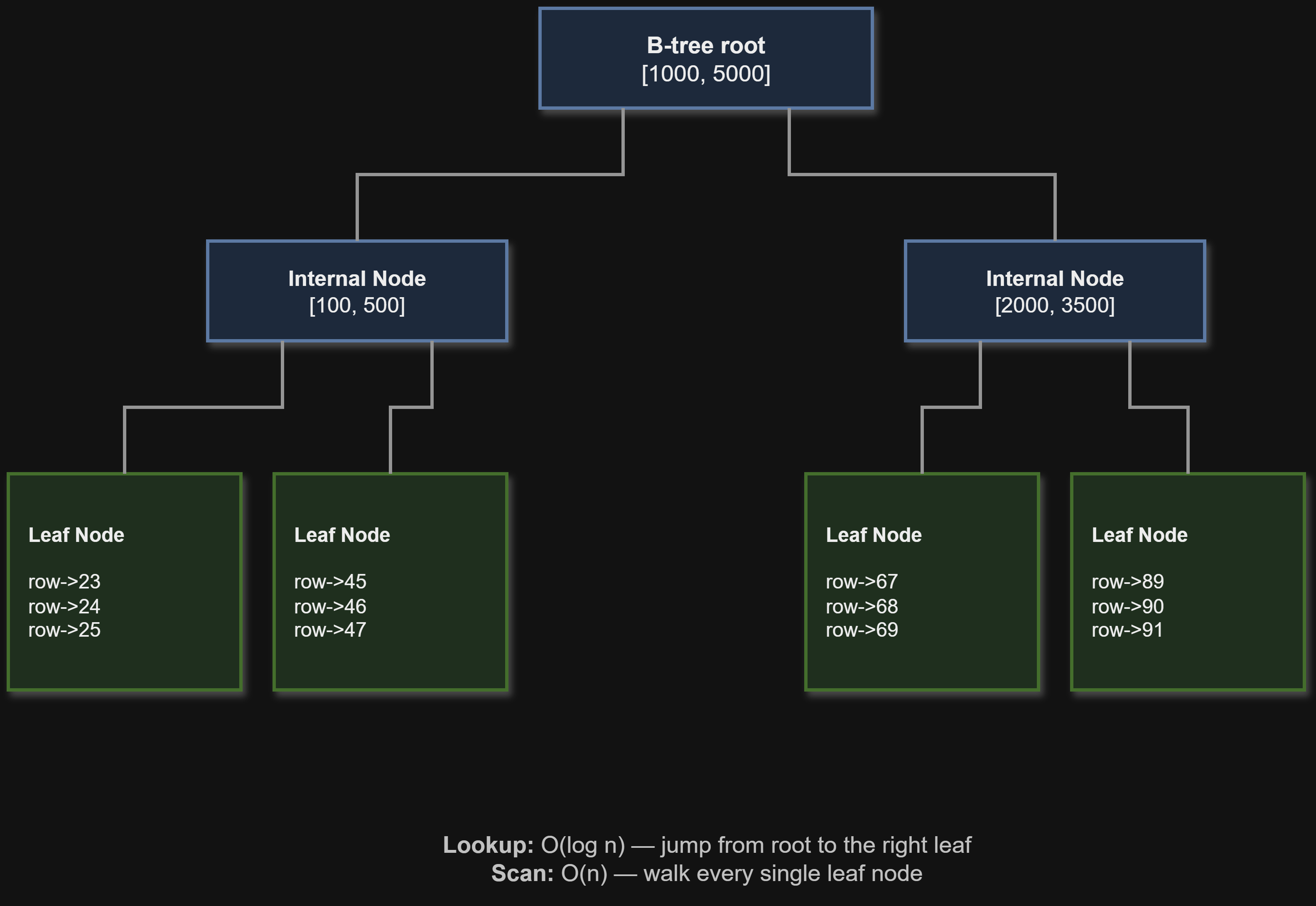
SQLite commonly uses B-tree indexes. A B-tree keeps indexed values in sorted order and is structured so the database can narrow its search efficiently. The index also points back to the corresponding table rows.
For a timeline of 100,000 clips, Carbon may need only the newest 60 unpinned clips. Without a suitable index, SQLite might need to inspect many rows and sort them before it can return those 60. An index designed for the query can help it find the right section and read entries in the requested order.
Carbon’s timeline queries filter by pinned status, may filter by type, and sort newest first. The indexes reflect those patterns:
CREATE INDEX idx_clips_pinned_created
  ON clips(pinned, created_at DESC, id DESC);

CREATE INDEX idx_clips_type_pinned_created
  ON clips(type, pinned, created_at DESC, id DESC);
The order of columns matters. A multi-column B-tree is ordered by its first column, then by its second within groups of the first, and so on. With pinned first, SQLite can locate the unpinned group. Within that group, the entries are ordered by timestamp and ID. The ID breaks ties when two clips share a timestamp.
An index does have costs. It uses disk space, and inserts or updates must keep it up to date. That is why I chose indexes based on Carbon’s actual query patterns rather than indexing every column.
Checking whether an index is useful
SQLite includes EXPLAIN QUERY PLAN, which describes how it intends to run a query:
EXPLAIN QUERY PLAN
SELECT * FROM clips
WHERE pinned = 0
ORDER BY created_at DESC, id DESC
LIMIT 60;
The output can show whether SQLite uses an index or scans the table, and whether it needs an extra temporary sort. That matters because creating an index does not guarantee that every query will use it. I used query plans to check what SQLite was doing after changing indexes, then timed the operations to see how the application behaved.
Carbon also has a partial index for repeated clips:
CREATE INDEX idx_clips_copy_count
  ON clips(copy_count DESC)
  WHERE copy_count > 1;
A partial index includes only rows that satisfy its WHERE condition. Since the dashboard is interested in clips copied more than once, this avoids putting single-copy clips into that particular index. The benefit depends on the data and query, so it is something to measure rather than assume.
FTS5: finding words inside clips
A regular B-tree index is good for structured values such as timestamps, pinned status, or clip type. It is not designed to find a word anywhere inside a large body of text. Carbon uses SQLite’s FTS5 extension for full-text search.
FTS5 maintains an inverted index. A regular table associates each row with its values. An inverted index works in the other direction: it associates each word with the rows that contain it.
Word      Clips containing that word
error     1, 3, 47, 891, ...
meeting   2, 56, ...
When someone searches for a word, the index gives FTS5 a set of matching clips to work with. That avoids starting each search by reading the text of every clip. It does not make every search take the same amount of time. Common words, broad queries, and additional filtering can still affect the work involved.
Carbon uses an external-content FTS table. The main clips table stores the clip text, while FTS5 stores the search index and refers back to the main rows:
CREATE VIRTUAL TABLE clips_fts USING fts5(
  text,
  content='clips',
  content_rowid='id',
  tokenize='unicode61',
  prefix='2 3 4 5 6 7 8 9 10'
);
Triggers keep the FTS index synchronized when clips are inserted, updated, or deleted. For example, an insert trigger adds the new row to the search index:
CREATE TRIGGER clips_ai AFTER INSERT ON clips BEGIN
  INSERT INTO clips_fts(rowid, text) VALUES (new.id, new.text);
END;
The update and delete triggers remove the old indexed text where necessary and add the new text for updates.
The prefix-search problem
Carbon supports prefix matching. If someone types err, a search can match terms such as error, errand, or errno. This is different from searching for one complete word.
I found a performance problem by comparing common-word and rare-word searches on a large synthetic dataset. The common search took much longer. FTS5 supports prefix indexes, which let it prepare lookups for the beginning of terms instead of doing the same prefix work during each query. I configured prefix lengths from 2 through 10:
prefix='2 3 4 5 6 7 8 9 10'
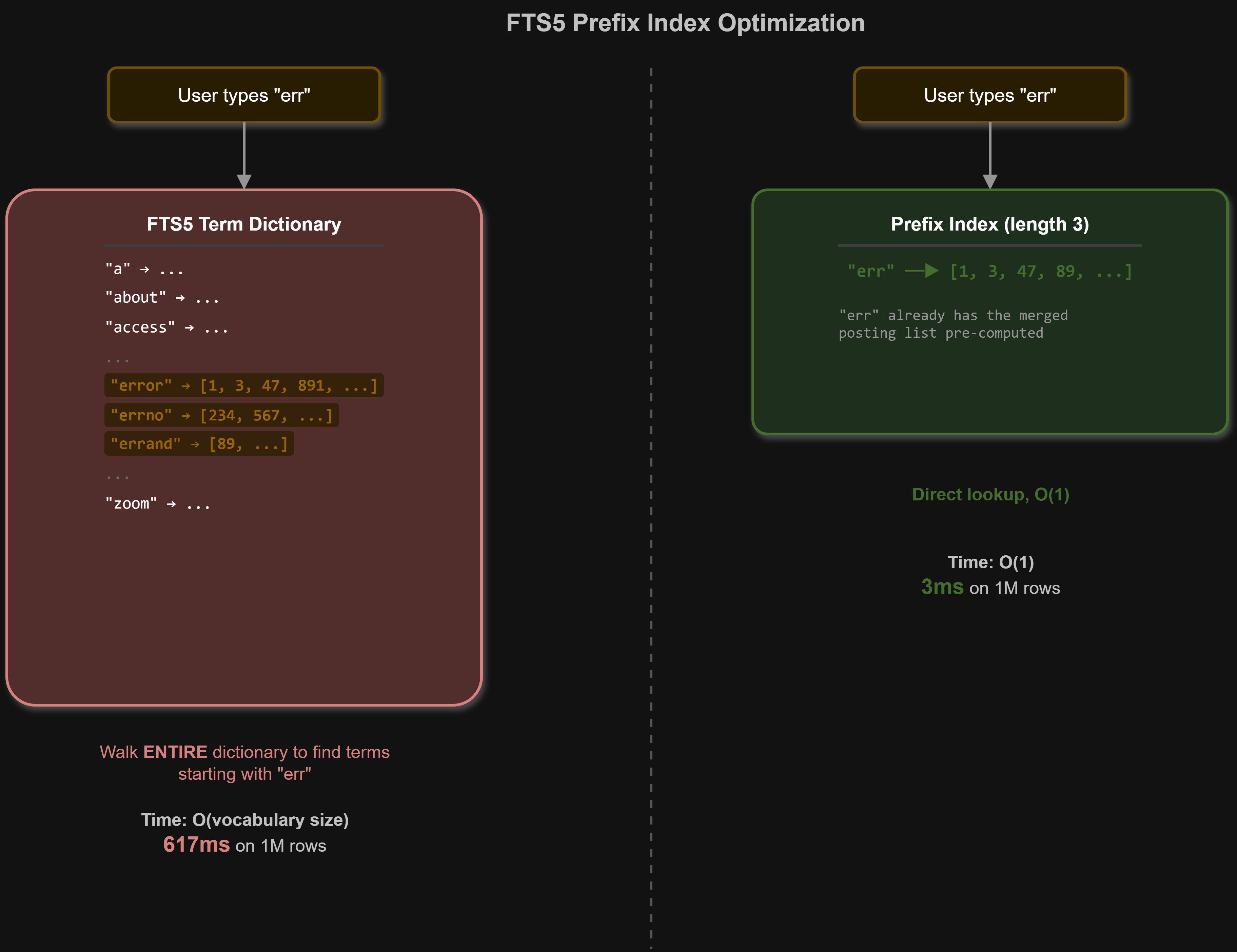
There is a trade-off. Prefix indexes use additional storage and require extra index work when clips are added or changed. In Carbon’s test, the improvement to prefix search was worth that cost. The common-word case that took 617 milliseconds took 3 milliseconds after the change.
That number belongs to that query and test dataset. It does not mean every search is 200 times faster. The useful lesson was that prefix searches behaved differently from the searches I had initially tested, and the benchmark helped me find the right configuration for Carbon.
Updating search indexes for existing users
A new FTS table definition does not change a table that was already created in an existing database. Carbon checks the stored definition and rebuilds the FTS table if the prefix configuration is missing. It then fills the index again from the clips table.
This is a one-time migration for a database that needs it. It matters because an optimization that only works for fresh installations is not a complete upgrade for people who already have clipboard history.
Keyset pagination: fetching the next part of the timeline
Carbon does not load every clip when the timeline opens. It fetches 60 at a time. The basic idea is pagination: divide a long list into smaller batches.
One common method uses LIMIT and OFFSET:
SELECT * FROM clips
ORDER BY created_at DESC, id DESC
LIMIT 60 OFFSET 5000;
This asks for 60 rows after skipping 5,000. The deeper the requested page, the more rows the database may have to pass over before reaching it. That is wasteful for a timeline where the user usually asks for the next batch, not for an arbitrary page number.
Carbon uses keyset pagination. The last row from the current page becomes a cursor. The next query asks for clips older than that timestamp and ID:
SELECT * FROM clips
WHERE pinned = 0
  AND (created_at, id) < (@cursorCreatedAt, @cursorId)
ORDER BY created_at DESC, id DESC
LIMIT 60;
The timestamp and ID together create a stable position in the ordered list. Because those values match the index ordering, SQLite can continue from that position rather than skipping a growing number of earlier rows. The exact cost still depends on the query and data, but this avoids the growing skip work associated with deep offsets.
The trade-off is that keyset pagination is naturally suited to continuing from a known item. It does not make jumping directly to page 347 convenient. For a scrolling clipboard timeline, that is a reasonable trade.
Handling responses that arrive out of order
There is also a UI problem. A user might type a new search before the previous search request has finished. If the older response arrives last, it must not overwrite the newer results.
Carbon uses a generation counter. Each time the query changes, the counter advances. A response is applied only if it belongs to the current generation:
const generation = ++generationRef.current
const page = await fetchPage(query)

if (generation !== generationRef.current) return
setItems(page.items)
This small check prevents a stale response from replacing results for a newer search or filter.
Virtualization: rendering the visible part of the list
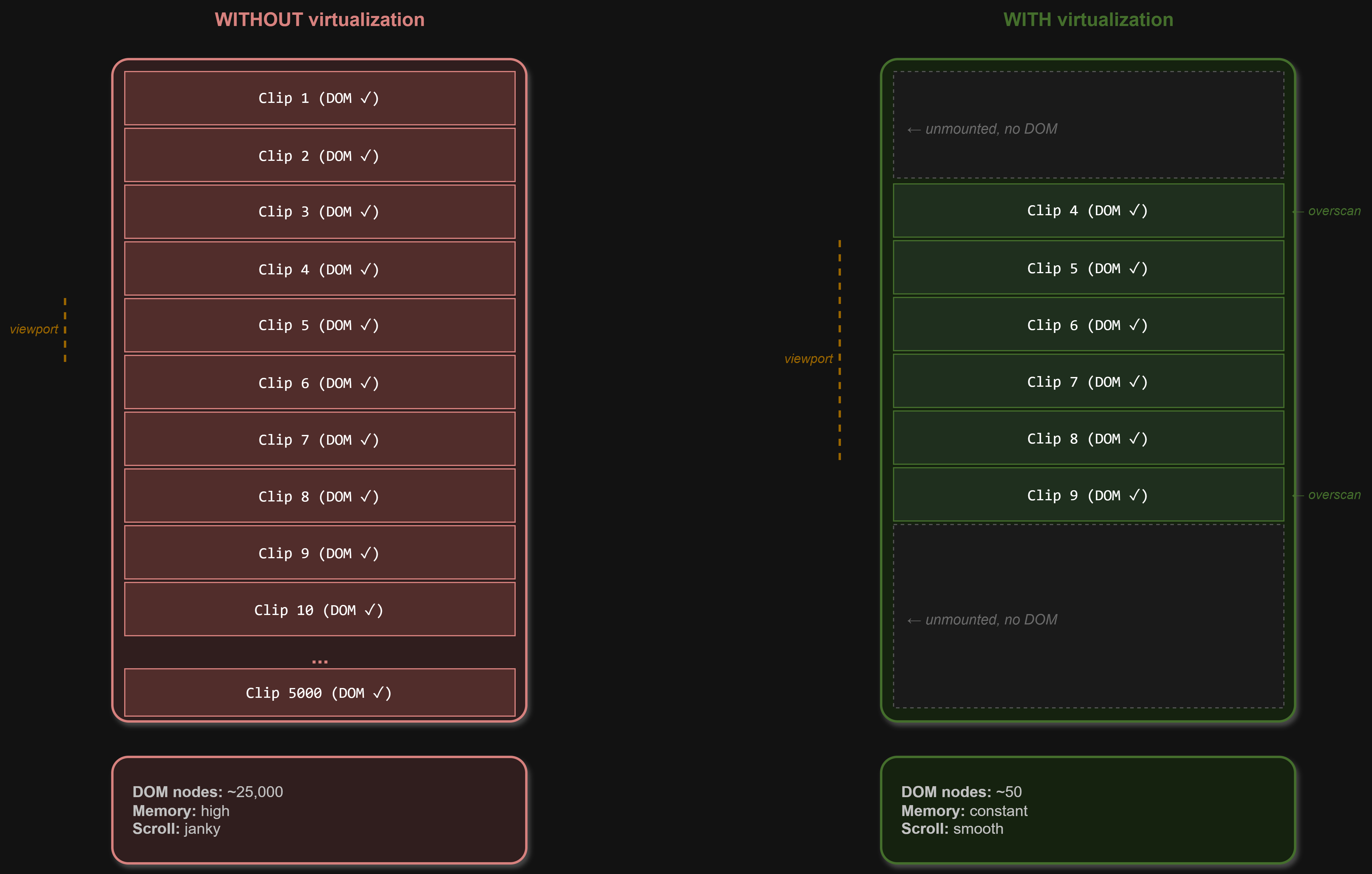
Fetching 60 clips at a time reduces how much data arrives in each request. But a user can keep scrolling, and the interface may accumulate many loaded clips. Even if the database is fast, rendering a very large number of UI elements can make the page sluggish.
A browser maintains a document tree called the DOM. Each card, text element, and control contributes nodes to that tree. Off-screen elements still exist in the DOM, use memory, and can take part in layout and rendering work.
Carbon uses react-window to render only the rows around the visible part of the timeline, plus a small buffer. As the user scrolls, rows that leave the rendered area are removed and new ones are rendered. This keeps the number of mounted elements bounded rather than growing with every clip loaded during a session.
Carbon’s timeline is not a flat list of identical cards. It includes date headers, clip cards with different heights, and a row that can trigger loading the next page. I represent those as a flat sequence of row types for the virtualized list:
type TimelineRow =
  | { kind: 'header'; key: string; title: string }
  | { kind: 'clip'; key: string; clip: ClipRecord }
  | { kind: 'sentinel'; key: string }
The sentinel is a special row at the end. When it enters the rendered area, it can trigger loadMore(). Clip cards can have different heights, so their sizes need to be measured and accounted for. Pagination and virtualization solve different parts of the problem: pagination controls how much data has been fetched, while virtualization controls how much of that data is mounted in the interface.
SQLite settings: tuning how the database works
Carbon configures a few SQLite settings when it opens the database:
function createSchema(): void {
  db.pragma('journal_mode = WAL')
  db.pragma('synchronous = NORMAL')
  db.pragma('cache_size = -32000')
  db.pragma('temp_store = MEMORY')
}
These settings affect journaling, durability, caching, and temporary work. They are not substitutes for suitable queries and indexes, and their impact depends on the workload.
Write-ahead logging (WAL) changes how SQLite records writes. It lets readers continue reading the database while changes are written to a separate log, rather than making readers wait for every write to finish. This is useful for Carbon because the app can be reading history while new clips are being recorded.
synchronous = NORMAL is a durability and performance choice used here with WAL mode. It reduces how often SQLite asks the operating system to force data to storage. A sudden machine power loss can put the most recent committed changes at risk, although an ordinary app crash is not the same as losing power. This setting is a deliberate trade-off, not a setting to copy without considering the data an app stores.
cache_size = -32000 configures SQLite’s page cache in kibibytes when the value is negative, giving it roughly 32 MiB for cached database pages. Repeated reads may then use pages already in memory rather than fetching them again from disk.
temp_store = MEMORY asks SQLite to keep temporary structures in memory instead of temporary files where possible. Queries that need temporary sorting or grouping can use such structures. The setting does not mean every query becomes faster, and memory use is part of the trade-off.
Measuring the changes
I generated synthetic datasets with up to one million clips. To make search tests challenging, I deliberately skewed the vocabulary so some words appeared in many clips. I measured common-word and rare-word searches, opening the app, scrolling, and date filtering.
| Scenario | Before | After |
|---|---|---|
| Search a word matching 60% of all rows | 617 ms | 3 ms |
| Search the most common word in the corpus | 471 ms | 4 ms |
| Search a rare word | 112 ms | 6 ms |
| Search on a 300,000-row dataset, earlier test pass | 355 to 669 ms | 20 to 23 ms |
These are measurements from my test setup, not universal performance guarantees. The million-clip case is deliberately much larger than most people are likely to need. It helped expose a slow search case that was not obvious in smaller tests.
I used EXPLAIN QUERY PLAN to see how SQLite planned the queries, and timed the application operations to check the end-to-end result. The plan helps explain whether an index is used. Timing tells me how the operation behaves in the test. Looking at both is more useful than guessing from either one alone.
Querying the dashboard
Once Carbon had a database, I could ask questions about my own clipboard history. The dashboard shows totals and activity patterns. Rather than loading all clip text into the interface, Carbon can ask SQLite for aggregate results.
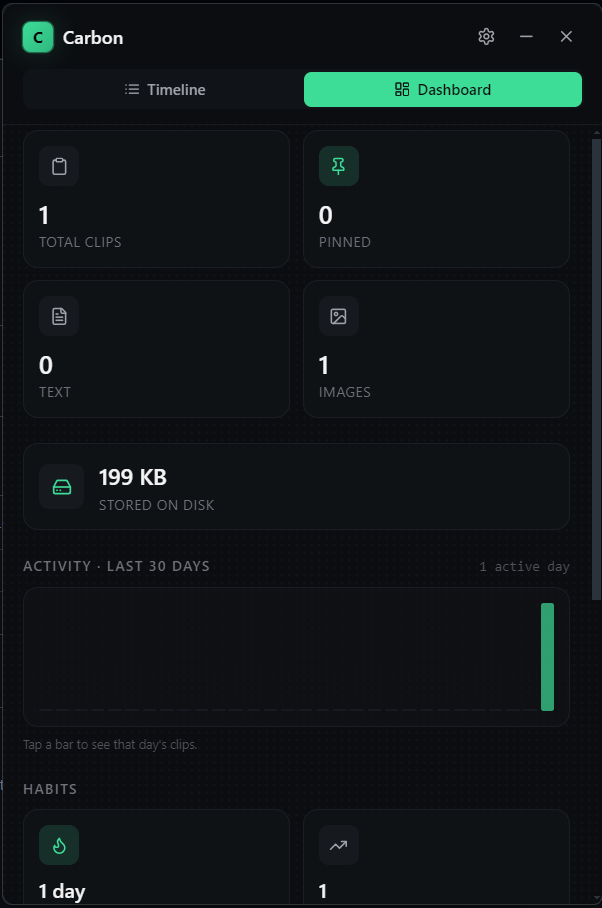
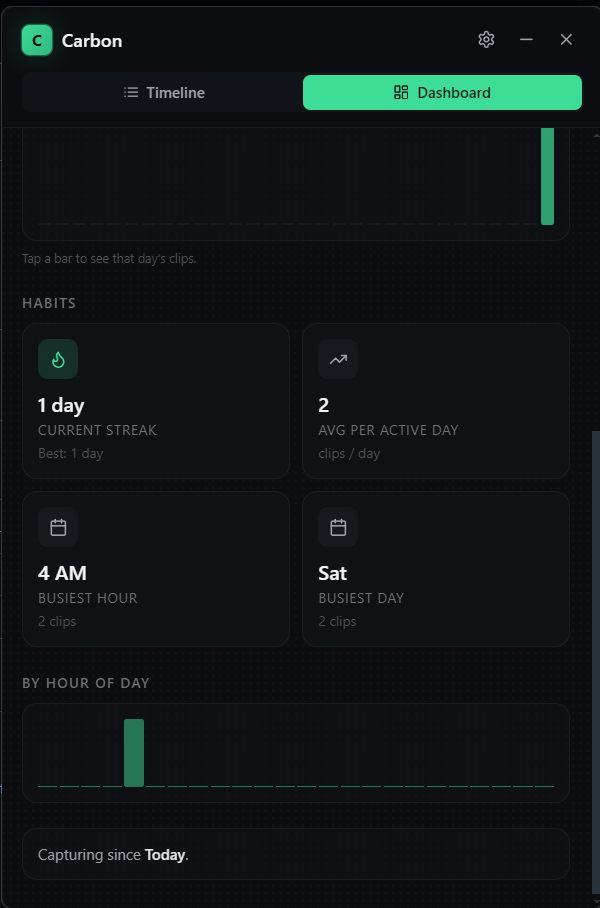
For example, these separate queries each calculate one statistic:
SELECT COUNT(*) FROM clips;
SELECT COUNT(*) FROM clips WHERE type = 'text';
SELECT COUNT(*) FROM clips WHERE type = 'image';
SELECT COUNT(*) FROM clips WHERE pinned = 1;
They can be combined into one aggregate query:
SELECT COUNT(*) AS total,
       SUM(type = 'text') AS text_count,
       SUM(type = 'image') AS image_count,
       SUM(pinned = 1) AS pinned_count,
       MIN(day) AS first_day,
       MAX(day) AS last_day
FROM clips;
In SQLite, a true comparison evaluates as 1 and a false comparison as 0, so summing a condition counts the rows where it is true. The query can calculate several summary values in one pass over the table. The dashboard also groups activity by day and calculates repeated clips from copy_count.
Packaging the app
The final app needs to work outside my development environment. electron-builder packages the Electron runtime, the UI, dependencies, and the compiled better-sqlite3 native module into a Windows installer.
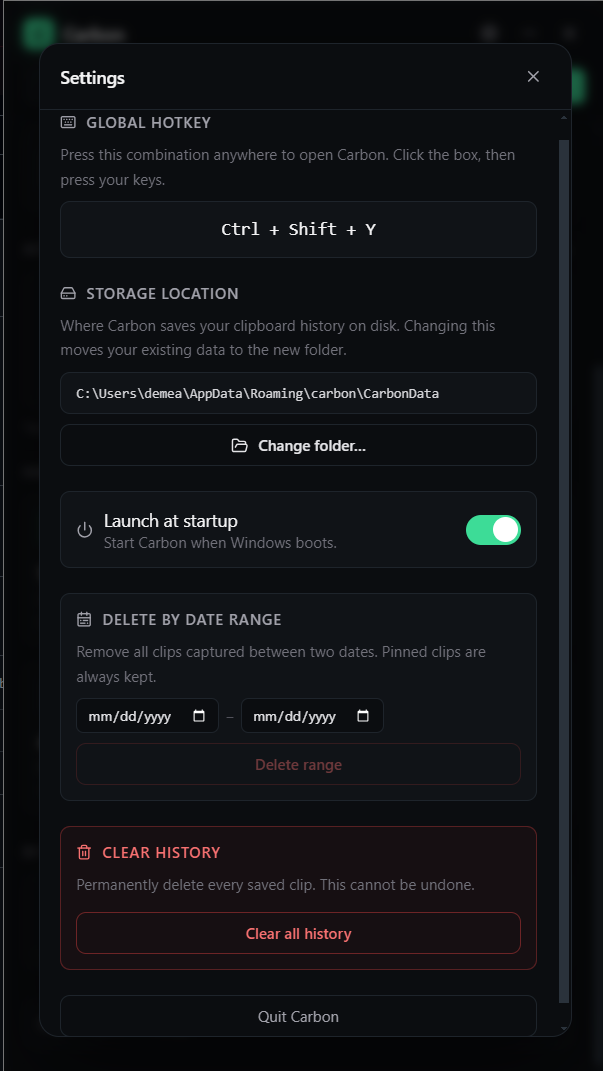
Native modules require special handling in Electron packages. Carbon’s installer configuration unpacks the native module from the ASAR archive, because a compiled native module cannot be loaded directly from inside that archive. The installer can then create shortcuts and install the app so it runs from the system tray.
What I learned
The rebuild taught me that performance is not one switch. The database needed indexes that fit the queries. Full-text search needed configuration that fit prefix searches. Pagination needed to avoid skipping more and more rows. The interface needed to avoid rendering everything it had loaded.
It also taught me to be specific about what a benchmark proves. The improvement from 617 milliseconds to 3 milliseconds is meaningful for the query and dataset I measured. It helped me find and fix a real bottleneck. It does not mean every search or every user will see that same improvement.
Carbon began as a small personal tool. Testing it at a scale I did not expect to need helped me understand where it was doing unnecessary work and which changes actually helped.
The companion post, I Built a Clipboard Manager After Windows Forgot What I Copied, tells the shorter story of the original problem and the rebuild.
About the author
- Pipelines, Probabilities, and Production
Comments
Join the discussionNo comments yet. Be the first to comment.